
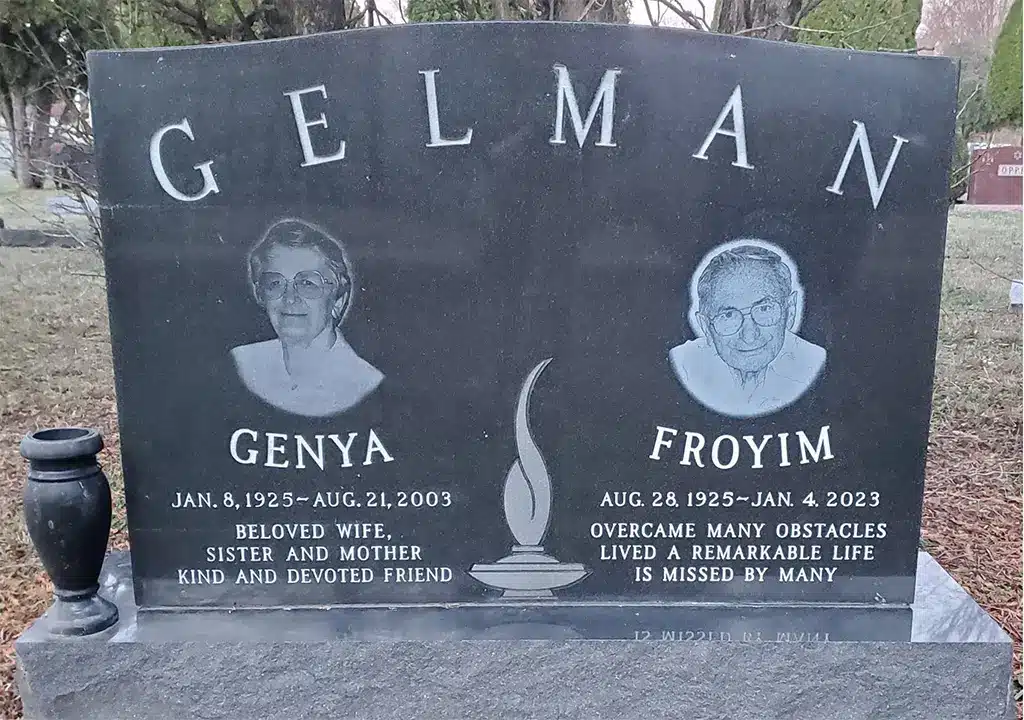
A photograph captures more than a person’s appearance. It can preserve a familiar expression, a warm smile, or a moment that immediately brings back memories. When incorporated into a cemetery monument, that image can help create a personal tribute that future generations can recognize and appreciate.
One way to add a portrait directly to a granite memorial is through portrait laser etching. This process uses computer-guided equipment to reproduce a photograph as a detailed monochromatic image on the polished surface of a granite headstone or grave marker.
Although the completed portrait may look almost photographic, creating it involves much more than placing a photograph into a machine. The original image must be evaluated, carefully edited, adapted to the stone, incorporated into the overall memorial design, approved by the family, and then etched using equipment calibrated for the granite and artwork.
Here is how a laser-etched headstone portrait is created from start to finish.
What Is Portrait Laser Etching?
Portrait laser etching is a memorial-personalization technique used to reproduce photographs and detailed artwork on polished granite.
A computer-controlled laser moves across the stone and alters tiny areas of its polished surface. The etched areas appear lighter than the surrounding granite, creating the contrast needed to reproduce facial features, clothing, hair, backgrounds, and other details.
The process does not print a conventional photograph onto the headstone. Instead, it translates the tones of the photograph into thousands of precisely positioned marks in the granite. Adjusting the density and arrangement of those marks creates the appearance of highlights, shadows, texture, and depth.
Laser engraving generally removes or changes the polished surface of the stone rather than relying on ink to create the image. Dark, fine-grained granite typically produces the strongest contrast and clearest detail.
The terms laser etching and laser engraving are often used interchangeably in the monument industry. Both usually refer to the use of laser technology to create fine artwork on the stone’s surface. This is different from traditional sandblasting, which is often used to create deeper lettering, dates, borders, and larger decorative elements.
Why Families Choose Laser-Etched Portraits
A traditional headstone inscription records important information such as a person’s name, birth date, and passing date. A portrait adds another layer of remembrance by showing the individual as family and friends knew them.
Families may choose portrait laser etching because it can:
- Reproduce fine facial details
- Create an image directly on the granite
- Complement names, dates, epitaphs, and emblems
- Incorporate meaningful backgrounds
- Personalize individual or companion monuments
- Preserve a recognizable likeness
- Create a highly customized cemetery memorial
Portraits may be used on upright monuments, slant markers, flush markers, companion memorials, cemetery benches, columbarium plaques, and other polished granite surfaces, subject to available space and cemetery regulations.
Step 1: Selecting the Photograph
The process begins with choosing the photograph that will serve as the reference image. The best photograph is not necessarily the newest or most professionally taken picture. It is the image that captures how the family wants the person to be remembered. A suitable photograph generally has:
- A clear view of the face
- Good focus
- Adequate lighting
- Visible facial features
- Enough resolution for enlargement
- Limited glare or harsh shadows
- A natural, recognizable expression
A high-quality digital photograph is often easiest to work with, but older printed photographs may also be usable. A physical photograph can be professionally scanned and restored before it is incorporated into the memorial design.
Can an Old or Damaged Photograph Be Used?
In many cases, yes. Families do not always have access to a sharp, modern portrait. The most meaningful image may be an older photograph with fading, scratches, discoloration, an unwanted background, or other people standing nearby. Digital editing can sometimes improve:
- Faded contrast
- Minor scratches
- Dust or marks
- Uneven lighting
- Distracting background elements
- Small areas of image damage
- Cropping and composition
However, editing cannot reliably restore facial details that were never captured in the original image. A very small, blurred, heavily shadowed, or low-resolution photograph may not produce the same level of detail as a clear original.
Rather than assuming a treasured photograph cannot be used, families should allow the monument designer to evaluate it.
Step 2: Choosing the Granite
The granite color and finish directly affect the appearance of the etched portrait.
Laser-etched images rely on contrast between the polished stone and the lighter marks created by the laser. For that reason, portraits are usually most visible on dark, polished granite.
Tegeler Monument Company offers laser etching on granite monuments and markers. Dark granite colors such as Jet Black and Bahama Blue generally provide the strongest contrast and highest level of detail for etched artwork.
Dark granite is especially effective for reproducing:
- Facial features
- Hair texture
- Clothing
- Fine lines
- Landscapes
- Vehicles
- Buildings
- Pets
- Detailed backgrounds
The consistency of the granite also matters. Stone containing prominent grains, crystals, or color variations may affect the uniformity of the image. The portrait should therefore be planned in relation to the actual granite selected for the memorial.
What About Lighter Granite?
Lighter granite may not provide enough contrast for a detailed photographic etching to appear clearly. Families who prefer a lighter-colored monument may consider another option, such as a ceramic, porcelain, or stainless-steel cameo photograph mounted to or inserted into the memorial.
A memorial professional can help compare the appearance, placement, maintenance, and design possibilities of a laser-etched portrait and a photo cameo.
Step 3: Preparing the Photograph Digitally
Once the photograph and granite have been selected, the image must be prepared for etching. This is one of the most important parts of the process. A standard color photograph contains continuous variations of color and tone, but a laser-etched granite portrait is created through contrasting light and dark marks. The photograph is therefore converted into a format the laser system can reproduce. Image preparation may include:
- Cropping the photograph
- Removing or simplifying the background
- Converting the image to grayscale
- Adjusting brightness and contrast
- Sharpening important details
- Reducing distracting shadows
- Improving facial definition
- Repairing minor damage
- Resizing the portrait for the monument
- Converting tones into a laser-compatible pattern
Laser-photo preparation commonly uses grayscale conversion, contrast adjustments, and dithering or similar techniques to translate highlights, shadows, and fine details into data that can be interpreted by the laser.
Why the Image Is Not Simply Copied
A portrait that looks excellent on a phone or printed page may not automatically translate well to granite.
For example:
- A dark shirt may blend into a dark background.
- Hair may lose definition without adjusted contrast.
- Strong facial shadows may obscure the eyes.
- A busy background may distract from the person.
- A tightly cropped image may feel crowded within the memorial layout.
The designer must consider how the photograph will look when reduced to variations of black, gray, and white on a fixed stone surface. In some cases, subtle adjustments are enough. In others, the image may require significant artistic preparation before it is suitable for etching.
Step 4: Creating the Memorial Layout
The portrait is only one part of the complete headstone design. It must be positioned in a way that works with the monument’s:
- Shape
- Dimensions
- Inscription
- Names and dates
- Epitaph
- Religious symbols
- Floral artwork
- Borders
- Vases
- Additional portraits
- Companion information
- Future inscriptions
The designer considers balance, spacing, readability, and visual hierarchy. A portrait that is too small may lose important detail, while one that is too large may overwhelm the lettering or leave inadequate space for other information. Possible portrait placements include:
- Centered above the name
- Positioned beside the inscription
- Framed within an oval
- Incorporated into a landscape
- Placed on one side of a companion monument
- Combined with a hobby, career, or religious design
- Extended across a larger memorial panel
For a companion monument, separate portraits can be balanced on each side. Another option is to use a photograph of the couple together.
Tegeler Monument Company creates custom memorials that can incorporate photographs, background images, hobbies, careers, pets, and other meaningful design elements.
Step 5: Reviewing the Design Proof
Before the portrait is etched into the granite, the family should have an opportunity to review the proposed memorial design.
Tegeler provides a two-dimensional rendering before work begins. Families can review the layout and request revisions before approving the design.
The proof may show:
- Portrait size and placement
- Names and dates
- Lettering style
- Epitaph
- Symbols and emblems
- Borders
- Decorative artwork
- Overall monument proportions
The proof is the time to confirm that the portrait is the correct photograph and that the image is positioned appropriately.
Families should carefully review:
- Facial appearance
- Hair and clothing details
- Portrait orientation
- Spelling
- Dates
- Punctuation
- Symbol placement
- Relationship between the portrait and text
Minor differences may exist between a digital rendering and the finished granite, but the proof provides a clear representation of the intended design.
Once the artwork is etched into the stone, changes may be difficult or impossible without replacing or substantially altering the affected portion of the memorial. Careful proof approval is therefore essential.
Step 6: Preparing the Granite Surface
Portrait etching is generally performed on a smooth, polished granite surface.
Before the laser process begins, the stone must be:
- Properly finished
- Clean
- Dry
- Correctly positioned
- Free from dust and surface residue
The equipment must also be aligned with the intended etching area. The operator establishes the correct starting position, dimensions, focus, and production settings.
Because granite is a natural material, settings may need to account for the stone’s color, grain, density, polish, and mineral composition.
Step 7: Converting the Portrait Into Laser Instructions
After the artwork is finalized, the digital portrait is converted into a machine-readable file.
The engraving system interprets the image as a pattern of individual marks. Those marks create the portrait through differences in spacing, density, and distribution.
Areas intended to appear lighter receive more visible etched marks. Areas intended to remain dark retain more of the original polished granite. Intermediate patterns create the visual impression of gray tones.
This approach is similar to how small dots in a printed image can appear as smooth shading when viewed from a normal distance.
The settings must be carefully controlled. Laser power, speed, focus, image resolution, and characteristics of the granite can all affect clarity.
Step 8: Etching the Portrait Into the Granite
The laser then travels across the designated area of the monument, creating the portrait one small section at a time.
Rather than carving broad, deep channels, the laser creates very fine surface changes. These lighter marks contrast with the surrounding polished granite and collectively form the finished image.
The laser can reproduce details such as:
- Eyes
- Eyebrows
- Smile lines
- Hair
- Clothing folds
- Jewelry
- Uniform details
- Flowers
- Natural scenery
- Vehicles
- Pets
The quality of the final result depends on several factors working together:
- The original photograph
- The digital artwork
- The granite color and consistency
- The size of the portrait
- The laser settings
- The experience of the designer and equipment operator
Laser technology provides precision, but professional judgment remains important throughout the process.
Step 9: Cleaning and Inspecting the Finished Portrait
Once the etching is complete, the surface is cleaned and inspected. The memorial professional checks:
- Portrait clarity
- Facial proportions
- Contrast
- Consistency
- Alignment
- Image placement
- Interaction with lettering and artwork
- Overall appearance of the memorial
The complete stone is also reviewed for accuracy before it is prepared for delivery or cemetery installation. This final inspection helps ensure that the portrait, lettering, and design match the approved layout.
Step 10: Coordinating Cemetery Approval and Installation
Every cemetery has its own rules governing memorials. Requirements may address:
- Monument size
- Marker style
- Granite color
- Portraits
- Etched artwork
- Religious symbols
- Foundation requirements
- Installation procedures
Families should confirm that the proposed design is permitted before production begins.
Tegeler Monument Company works with cemeteries throughout Maryland, Washington, D.C., Virginia, Pennsylvania, and West Virginia and can help families understand applicable memorial requirements. Tegeler also provides professional installation where permitted and coordinates with cemetery personnel when the cemetery performs its own installation.
What Makes a Good Laser-Etched Headstone Portrait?
The most successful portraits combine technical quality with personal meaning. A good etched portrait usually has:
- A recognizable expression
- Clear eyes and facial features
- Balanced lighting
- Adequate size
- Strong contrast against the stone
- A layout that complements the inscription
- A photograph that feels authentic to the person
The goal is not necessarily to choose the most formal photograph. A candid image may better capture someone’s warmth, humor, confidence, or personality.
The designer can help determine whether the chosen photograph will translate effectively to granite while preserving the qualities that make it meaningful.
What Else Can Be Added to a Portrait Etching?
A portrait can be combined with other imagery to tell a fuller story.
Popular additions include:
- Favorite flowers
- Religious imagery
- Military emblems
- Occupational symbols
- Musical instruments
- Sports equipment
- Cars or motorcycles
- Farm or landscape scenes
- Homes or buildings
- Pets
- Wedding imagery
- Nature backgrounds
- Meaningful quotes
These elements can be placed around the portrait, blended into the background, or incorporated elsewhere on the memorial.
The result can be a custom headstone that communicates not only what a loved one looked like, but also what mattered to them.
Portrait Laser Etching vs. a Photo Cameo
Both options can add a photographic likeness to a cemetery monument, but they create different appearances.
Laser-Etched Portrait
A laser-etched portrait:
- Is created directly on the granite
- Has a monochromatic appearance
- Works especially well on dark polished stone
- Can be integrated into larger scenes and designs
- Does not require a separate photographic insert
Photo Cameo
A cameo photograph:
- Is produced as a separate ceramic, porcelain, or metal element
- Can provide a full-color or photographic appearance
- May work well on light or dark granite
- Is mounted to or inserted into the memorial
- Can be framed in different shapes and styles
The right option depends on the selected granite, preferred appearance, available space, photograph, and cemetery requirements.
Frequently Asked Questions About Portrait Laser Etching
Can any photograph be laser etched?
Many digital and printed photographs can be used, but image quality affects the result. Clear, well-lit photographs usually produce better detail. A designer should evaluate older, damaged, small, or blurry images before promising a particular result.
Does the portrait have to be a formal photograph?
No. Families may choose a formal portrait, candid photograph, wedding picture, military photograph, family image, or another meaningful picture.
Can the background be removed?
Yes, backgrounds can often be removed, softened, simplified, or replaced during the digital design process.
Can two people be included in one etching?
Yes. A shared photograph may be used, or separate photographs can sometimes be combined into one balanced design.
Can pets be included?
Yes. Pet portraits and images of animals can be incorporated into custom cemetery monuments.
Is black granite required?
Black granite is not always required, but dark polished granite typically provides the strongest contrast for detailed portrait etching. Tegeler identifies Jet Black and Bahama Blue as particularly effective choices.
Can a portrait be added to an existing headstone?
It may be possible, depending on the monument’s material, color, finish, available space, condition, location, and cemetery rules. The stone should be professionally evaluated before a design is proposed.
Is laser etching the same as sandblasting?
No. Sandblasting is commonly used for deeper lettering and traditional monument designs. Laser etching is generally used for fine surface details, photographs, and complex imagery. The two methods may be used together on the same memorial.
Create a Memorial That Preserves a Familiar Face
Portrait laser etching allows families to transform a meaningful photograph into an enduring part of a granite memorial.
The process combines photo restoration, digital artistry, monument design, precise equipment, granite craftsmanship, and careful quality control. Each stage, from selecting the photograph to approving the proof, helps determine how successfully the finished portrait will reflect the person being remembered.
Tegeler Monument Company has helped families create custom cemetery monuments for generations. Our designers can help you select a photograph, compare granite colors, develop the memorial layout, understand cemetery requirements, and create a personalized tribute that reflects your loved one’s life.
Contact Tegeler Monument Company to discuss a portrait laser etching, photo-engraved headstone, custom granite monument, or personalized grave marker for a cemetery in Maryland, Washington, D.C., Virginia, Pennsylvania, West Virginia, or beyond.
Comments are closed